Intelligence
To retrieve threat intelligence from ThreatStream.
ThreatStream provides multiple methods for retrieving threat intelligence. Use the following criteria to determine which method is appropriate for your needs:
| Task | Appropriate Method |
|---|---|
| Downloading small intelligence sets on an ad-hoc basis. |
Use the Intelligence API. |
| Downloading large intelligence sets–those spanning thousands of pages–on an ad-hoc basis. | Use the Snapshot API. See Snapshot for more information. |
| Downloading large intelligence sets–those spanning thousands of pages–on a regular basis. | Use ThreatStream Integrator. Contact your Anomali Support representative for more information. |
You can specify criteria by which the intelligence should be retrieved, as shown in the examples below.
Request
/api/v2/intelligence/
/api/v1/intelligence/ requests are now deprecated. Anomali recommends using /api/v2/intelligence/ for all requests.HTTP Methods: GET
| Get a list of observables | GET /api/v2/intelligence |
| Get a list of local observables (for ThreatStream OnPrem only) | GET /api/v2/intelligence/?local_only=true |
| Get a list of remote observables (for ThreatStream OnPrem only) |
GET Only use this attribute when retrieving remote observables from ThreatStream Cloud. Set this attribute to Do not set this attribute to |
For attributes that can be used for filtering, see the Attributes table below.
Response
Format: JSON
Number of rows returned (by default): 20
Attributes: See the table below
Order of attributes: The attributes are sorted by the modified_ts attribute, in descending order.
Attributes
| Attribute | Type | Filter Operators | Description |
|---|---|---|---|
| asn | string | "exact", "startswith", "contains" | Autonomous System (AS) number associated with the indicator. |
| can_add_public_tags | boolean | "exact" | Indicates whether a user can add public tags to a Threat Model entity. |
| confidence | long | "exact", "lt", "lte", "gte", "gt" |
Confidence score that reflects the likelihood that an observable exhibits or is connected to malicious behavior. It is derived from a combination of factors such as source-reported confidence, source confidence weight (in percentage), and Retina confidence—ThreatStream’s machine learning-based scoring engine. See retina_confidence and source_reported_confidence. Confidence scores range from 0-100, in increasing order of confidence. Note:ThreatStream only scores domain, IP, and URL observables. For all other observable types, the source-reported confidence value is used.
|
| country | string | "exact", "startswith", "contains" | Country associated with the indicator. |
| created_by | string | Not available for filtering | Email address of the user who submitted the import job containing the observable. |
| created_ts | date | "exact", "lt", "lte", "gte", "gt" |
When the indicator was first seen on the ThreatStream cloud platform. Date must be specified in this format: YYYYMMDDThhmmss where T denotes the start of the value for time, in UTC time. For example, 2014-10-02T20:44:35. |
| description | n/a | This attribute is for internal use and can be ignored. | |
| expiration_ts | date | "exact", "lt", "lte", "gte", "gt" |
Time stamp of when intelligence will expire on ThreatStream, in UTC time. Note: expiration_ts can only be specified in an advanced search query. See Advanced Search Queries for more information. |
| feed_id | long | "exact" |
Numeric ID of the threat feed that generated the indicator. feed_id = 0 for user-created indicators. |
| full_count | integer | "exact" |
Set |
| id | string | Not available for filtering |
Unique ID for the indicator. This identifier is assigned to the indicator when it is first created on ThreatStream. Unlike update_id, this identifier never changes as long as the indicator is available on ThreatStream. |
| import_session_id | long | "exact" |
ID of import session in which the indicator was imported. import_session_id=0 if the indicator came in through a threat feed. |
| ip | string | "exact", "startswith", "contains" | The IP address associated with the indicator if the imported indicator is a domain or a URL. |
| is_anonymous | boolean | "exact" | Whether the organization and user information is anonymized when the observable is accessed by users outside of the owner organization. |
| is_editable | boolean | Not available for filtering |
Indicates whether the imported entity can be updated by an intelligence source. This attribute is reserved for intelligence source providers and can be ignored. |
| is_public | string/ boolean |
"exact" |
Visibility of the indicator—public or private. 0/False—if the indicator is private or belongs to a Trusted Circle 1/True—if the indicator is public Default: 0/False Note: This attribute is treated as a string or boolean in requests and as boolean in responses.
|
| itype | string | "exact", "startswith", "contains" | Indicator type. See Indicator Types in ThreatStream. See Fraud Indicator Types for ThreatStream OnPrem for a list of indicator types exclusive to ThreatStream OnPrem. |
| latitude | double | "exact", "lt", "lte", "gte", "gt" | Latitude associated with the Geo location of the IP. |
| local_only (for ThreatStream OnPrem only) | boolean |
"exact" |
Whether to retrieve only local observables on ThreatStream OnPrem. True—retrieve local observables only. See remote_api (for ThreatStream OnPrem only) for retrieving only remote observables. |
| locations | list of dicts | "exact" |
Same as target_locations. See target_locations. In responses, the locations field includes IDs, names, and values of target locations associated with the observable. |
| longitude | double | "exact", "lt", "lte", "gte", "gt" |
Longitude associated with the Geo location of the IP. |
| meta.detail | string | "exact", "startswith", "contains" | A string that contains a tag associated with the indicator; the tag can be used to search for related indicators. |
| meta.detail2 | string | "exact", "startswith", "contains" | Additional details associated with state of an indicator. For example, details such as why is an indicator marked false positive. |
| meta.maltype | string | "exact", "startswith", "contains" | Tag that specifies the malware associated with an indicator. |
| meta.registrant_* | string | Not available for filtering | Information available from WHOIS about the domain of the indicator (if any) at the time it was imported to ThreatStream. |
| meta.severity | string | "exact", "startswith", "contains" |
Severity assigned to the indicator through machine-learning algorithms ThreatStream deploys. Possible values: low, medium, high, very-high |
| modified_ts | date | "exact", "lt", "lte", "gte", "gt" |
When the indicator was last updated on the ThreatStream Cloud platform. Date must be specified in this format: YYYYMMDDThhmmss where T denotes the start of the value for time, in UTC time. For example, 2014-10-02T20:44:35 See Using the Intelligence API in Continuous Operations on how to use this attribute for retrieving intelligence. |
| org | string | "exact", "startswith", "contains" | Registered owner (organization) of the IP address associated with the indicator. |
| owner_organization_id | long |
Not available for filtering |
ID of the (ThreatStream) organization that brought in the indicator, either through a threat feed or through the import process. |
| rdns | string | "exact", "startswith", "contains" | Domain name (obtained through reverse domain name lookup) associated with the IP address that is associated with the indicator. |
| remote_api (for ThreatStream OnPrem only) | boolean | "exact" |
Whether to retrieve remote observables (stored on Cloud). Only use this attribute when retrieving remote observables from ThreatStream Cloud. Set this attribute to Do not set this attribute to See local_only (for ThreatStream OnPrem only) for retrieving only local observables. |
| retina_confidence | long | "exact", "lt", "lte", "gte", "gt" |
Confidence score calculated using ThreatStream’s machine learning-based scoring engine. This score is only calculated for IP-, domain-, and URL-based observables. For email and hash-based observables, the source-reported confidence is assumed. When Retina score is –1, it implies that a valid score could not be calculated or the source-reported confidence was exclusively used. This score is one of the factors used to determine the final confidence score of observables. |
| search_filter | integer | "exact" |
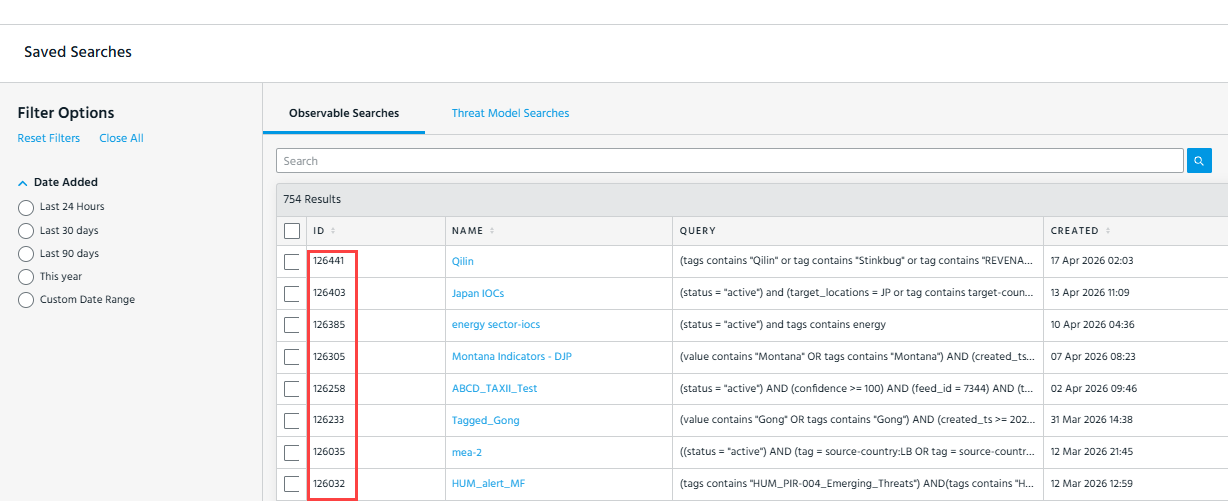
ID of the saved search filter you want to execute. There are two methods of retrieving saved search filter IDs:
Important: When using
search_filter, it cannot be combined with q (advanced search) or basic search filters. Pagination and sorting parameters such as limit and sort are still supported.Note: For ThreatStream OnPrem users only: the Intelligence API does not support a merged view of local and remote threat intelligence when you use the
|
| sort | n/a | This attribute is for ThreatStream's internal use and can be ignored. | |
| source | string | Not available for filtering |
Usually an obfuscated description of the source of the indicator; the description may not be obfuscated if the user belongs to your organization. Examples of source names: threat feed name, Analyst (if the user name is obfuscated). |
| source_created | datetime | "exact", "lt", "lte", "gte", "gt" |
Time stamp of when the entity was created by its original source. |
| source_locations | list of dicts | "exact" |
ID, name, and value of a source location. Possible values include letter codes of regions, countries, and administrative areas (US States and Washington DC only) as defined by STIX 2.1. For example, Note: ThreatStream retrieves indicators that come from all locations that are part of the specified region/country/administrative area. For example, if you specify
source_locations=europe, ThreatStream will retrieve indicators associated with all European countries such as Germany, Poland, France, Belgium, and so on. |
| source_modified | datetime | "exact", "lt", "lte", "gte", "gt" | Time stamp of when the entity was last updated by its original source. |
| source_reported_confidence | integer | "exact", "gt","lt","gte","lte" | A risk score from 0 to 100, provided by the source of the indicator. |
| status | string | "exact" |
Status assigned to the indicator. For example, active, inactive, falsepos. |
| subtype | string | "exact" |
For hash observables—those with type=md5—subtype provides additional metadata on the type of hash associated with the observable. Possible values: MD5, SHA1, SHA256, SHA512. |
| tags |
string |
"exact", "startswith", "contains" |
Tags applied to the specified observables. Tags must be specified as follows:
Tag Attributes:
|
| target_industry | string | "exact" |
Target industries associated with the indicator. Possible values are defined by the STIX 2.1 Industry Sector vocabulary. For example, |
| target_locations | list of dicts | "equal to" |
Target locations associated with the observable. Possible values include letter codes of regions, countries, and administrative areas (US States and Washington DC only) as defined by STIX 2.1. For example, Notes:
|
| threatscore (deprecated) | integer | Not available for filtering |
Deprecated. |
| threat_type | string | "exact" | Summarized threat type of the indicator. For example, malware, compromised, apt, c2, and so on. |
| tlp | string | "exact" | Traffic Light Protocol designation for the intelligence—red, amber, amber+green, clear. |
| trusted_circle_ids | integer | "exact" | IDs of the trusted circles with which the indicator is shared. |
| type | string | "exact" | Type of indicator—domain, email, ip, md5, string, url. |
| update_id | integer | "exact", "gt","lt","gte","lte" |
An incrementing numeric identifier associated with each update to intelligence on ThreatStream. Every time indicator data changes on ThreatStream (for example, if it is updated or expires), the update_id of the indicator is incremented and stored in the indicator. This identifier is mostly used by software that interact with ThreatStream to download intelligence, such as ThreatStream Link and ThreatStream APIs. See Using “update_id” to Retrieve Large Intelligence Datasets for more details. |
| uuid | string | UUID (universally unique identifier) assigned to the observable for STIX compliance. | |
| value | string | "exact", "startswith", "contains" | Value of the observable. For example, value = <192.168.0.10> or value = <http://www.google.com>. |
| workgroups | n/a | Not used. |
Using “update_id” to Retrieve Large Intelligence Datasets
For the Intelligence API, when the total number of results is greater than 10,000, Anomali recommends using the update_id parameter to return the full dataset through iterative API calls. Using the update_id method ensures large datasets are retrieved without impacting performance.
This method involves appending the following to your API call:
update_id__gt=0&order_by=update_id
After making the first request, locate the update_id of the last returned object (the 1,000th result).
For example:
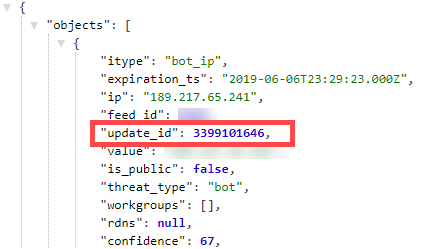
Use this value for the update_id__gt variable in your next API call. Repeat this process iteratively until no further results are returned.
update_id__gt value must be included within the q= expression. Example (basic search query):
Run the following API call to retrieve all active intelligence that has been added or modified since January 10, 2018:
curl 'https://api.threatstream.com/api/v2/intelligence/?modified_ts__gt=2018-01-10&status=active&update_id__gt=0&order_by=update_id' -H 'Authorization: apikey <username>:<api_key>'The update_id value of the last retrieved result—the 1,000th result in this case—is 11849.
{...
  "asn": "3786",
  "classification": "public",
  "confidence": "90",
  "severity": "very-high",
  "source": "<source_name>",
  "source_feed_id": null,
  "srcip": "211.169.202.2",
  "srcipv6": null,
  "state": "active",
  "trusted_circle_ids": null,
  "update_id": "11849"
...
        }
Therefore, the next API call you would make is:
curl 'https://api.threatstream.com/api/v2/intelligence/?modified_ts__gt=2018-01-10T00:00:00&status=active&update_id__gt=11849&order_by=update_id' -H 'Authorization: apikey <username>:<api_key>'
Example (advanced search query):
Run the following API request to retrieve intelligence of APT IP, Bot IP, and C2 IP types with a confidence score of 90 or higher.
curl 'https://api.threatstream.com/api/v2/intelligence/?q=(confidence>=90+AND+(itype="apt_ip"+OR+itype="bot_ip"+OR+itype="c2_ip")+AND+update_id>0)&order_by=update_id' -H 'Authorization: apikey <username>:<api_key>'
The update_id value of the last retrieved result—the 1,000th result in this case—is 2237854.
{...
  "modified_ts": "2015-04-13T23:00:00.123Z",
  "update_id": 2237854,
  "country": "IN",
  "latitude": 28.6667,
  "type": "ip"
  ...
}
Therefore, the next API call you would make is:
curl 'https://api.threatstream.com/api/v2/intelligence/?q=(confidence>=90+AND+(itype="apt_ip"+OR+itype="bot_ip"+OR+itype="c2_ip")+AND+update_id>2237854)&order_by=update_id' -H 'Authorization: apikey <username>:<api_key>'Using the Intelligence API in Continuous Operations
If you call the Intelligence API through an automated script for continuous synchronization, follow the guidance in this section to ensure you retrieve all available data within the time frame of interest. Data ingested by ThreatStream is not available instantaneously. To reduce the chance of missing data still being processed by ThreatStream at the time of script execution, use update_id to iteratively retrieve data and set modified_ts__lt to one minute before the current UTC time stamp.
Example:
curl 'https://api.threatstream.com/api/v2/intelligence/?modified_ts__lt=<minus_1_minute>&status=active&update_id__gt=0&order_by=update_id' -H 'Authorization: apikey <username>:<api_key>'where <minus_1_minute> is the time stamp of the current time minus one minute in YYYYMMDDThhmmss format
Advanced Search Queries
Most filtering criteria can be specified using filter operators described in this document. However, if you need to specify a complex filter, you can use an advanced search query. This method allows you to specify queries similar to those you formulate on the Advanced search screen on the ThreatStream user interface. To specify a filter language query, use this syntax in the API call: &q=<filter_language_query>. The filter operators used for the filter language query are the symbolic form (=, <, >, and so on) and not the descriptive form (exact, lt, gt, and so on) and the query must be URL encoded. See To retrieve intelligence using an advanced search query: for an example.
Examples
As Intelligence API calls can yield large numbers of results, the following examples use the limit attribute to limit the number of results displayed in an API call.
By default, if the limit parameter is not specified, 20 records are fetched at a time. However, when limit=0, a maximum of 1000 the total records that meet the query are fetched.
If the total records returned exceed the defined limit or number greater than 1,000 but fewer than 10,000, use the next field of the returned metadata to make iterative API calls until all records are returned. If total records number greater than 10,000, follow the directions under Using “update_id” to Retrieve Large Intelligence Datasets to fetch complete results.
-
To retrieve the 100 most recent threat intelligence entries in ThreatStream:
Copycurl 'https://api.threatstream.com/api/v2/intelligence/?limit=100' -H 'Authorization: apikey <username>:<api_key>' -
To retrieve the first 20 threat intelligence entries with a confidence greater than 80, and a severity of “low”:
Copycurl 'https://api.threatstream.com/api/v2/intelligence/?meta.severity=low&confidence__gt=80' -H 'Authorization: apikey <username>:<api_key>' -
To retrieve all of the intelligence for indicator type "mal_ip" in ThreatStream since a particular date and time:
Copycurl 'https://api.threatstream.com/api/v2/intelligence/?status=active&modified_ts__gte=2014-10-02T20:44:35&limit=0&is_public=1&itype=mal_ip' -H 'Authorization: apikey <username>:<api_key>' -
To retrieve all of the intelligence in ThreatStream since a particular date AND country = "CN":
Copycurl 'https://api.threatstream.com/api/v2/intelligence/?status=active&date_last__gte=2014-10-02T20:44:35&is_public=1&limit=0&country__exact=CN' -H 'Authorization: apikey <username>:<api_key>' -
To retrieve all of the intelligence in ThreatStream that is tagged with the value "energetic-bear":
Copycurl 'https://api.threatstream.com/api/v2/intelligence/?status=active&is_public=1&limit=0&tags.name=energetic-bear&' -H 'Authorization: apikey <username>:<api_key>' -
To retrieve all intelligence that contains "myexample.com":
Copycurl 'https://api.threatstream.com/api/v2/intelligence/?value__contains=myexample.com&limit=0' -H 'Authorization: apikey <username>:<api_key>'Tip: For best results, values specified after the contains operator should be at least 3 characters. -
To retrieve intelligence using an advanced search query:
Copycurl 'https://api.threatstream.com/api/v2/intelligence/?limit=0&q=(expiration_ts>=2022-01-30T08:00:00+AND+confidence>=90+AND+(itype="apt_ip"+OR+itype="bot_ip"+OR+itype="c2_ip"))' -H 'Authorization: apikey <username>:<api_key>'For more information on specifying advanced search queries, see Advanced Search Queries.
-
(Only on ThreatStream OnPrem) To retrieve 100 most recent threat intelligence entries stored remotely (on ThreatStream Cloud):
Copycurl 'https://api.threatstream.com/api/v2/intelligence/?limit=100&remote_api=true' -H 'Authorization: apikey <username>:<api_key>' -
(Only on ThreatStream OnPrem) To retrieve remote intelligence based on a saved search filter whose ID is 398 and which is stored remotely (on ThreatStream Cloud):
Copycurl 'https://<OnPrem_IP_or_FQDN>/api/v2/intelligence/?search_filter=398&remote_api=true' -H 'Authorization: apikey <username>:<api_key>' -
(Only on ThreatStream OnPrem) To retrieve local intelligence based on a saved search filter whose ID is 1002538 and which is stored locally (on ThreatStream OnPrem):
Copycurl 'https://api.threatstream.com/api/v2/intelligence/?search_filter=1002538' -H 'Authorization: apikey <username>:<api_key>'
Search Filter
To retrieve information on search filters saved from the ThreatStream user interface. After identifying the ID of a search filter, you can execute a query by specifying the search filter ID in the search_filter parameter of an Intelligence API request.
Request
/api/v1/search_filter/
HTTP Method: GET
Response
Format: JSON
Number of rows returned (by default): 20
The following is an example response for an individual saved search filter:
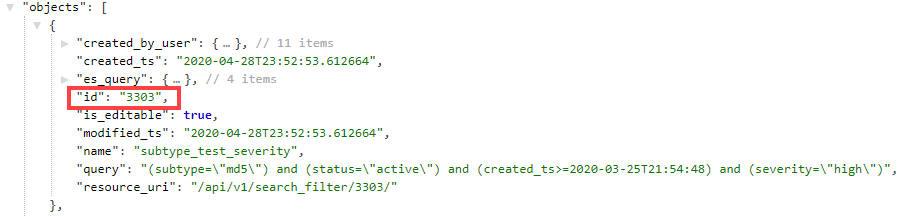
Example
To retrieve a list of search filters saved by your organization:
curl 'https://api.threatstream.com/api/v1/search_filter/' -H 'Authorization: apikey <username>:<api_key>'Observable Cloning
To create a separate instance of an observable. After identifying the ID of an observable, you can execute a clone request by specifying the observable ID in an Intelligence API request.
When you clone an observable, an import session is initiated, which must be approved to add the cloned observable to your threat intelligence.
Request
/api/v2/intelligence/<observable_id>/clone/
/api/v1/intelligence/ requests are now deprecated. Anomali recommends using /api/v2/intelligence/ for all requests.HTTP Method: POST
Response
HTTP 202 Accepted {"job_id": "<background_job_id>", "import_session_id": "<import_session_id>"}
where
job_id is an identifier for the job on ThreatStream.
import_session_id is the ID for the initiated import job. You will need this ID to review and approve the import job.
Example Response:
{"job_id": "368ab6dc-7955-4fd7-aef9-b8cd5496fcb1", "import_session_id": "346928"}
Example
To clone an observable with ID 11202475 which belongs to another organization to your own organization:
curl -X POST 'https://api.threatstream.com/v2/intelligence/11202475/clone/' -H 'Authorization: apikey <username>:<api_key>'After this, proceed with approving the initiated import job. See Import (with approval) for more details.